Security operations centers have spent years refining detection engines and response playbooks to automate the routine. Yet complex cases still demand hands-on investigation, requiring specialized expertise to navigate nuanced business context and risk. This is where human-agent collaboration can play an important role in bridging the divide between rigid automation and manual triage, to speed real-time investigations.
Previously in Cortex, agent interactions were limited to private, one-on-one chats between analyst and agent. During collaborative investigations, this left critical context fragmented across isolated prompt histories, disconnected from the case lifecycle, and invisible to peers working on the same case.
Agent Collaboration redefines this model by introducing agents as persistent, collaborative members of your security workforce, fully integrated into the case lifecycle, shared operational queues, and team workflows.
Persistent Teammates Across the Case Lifecycle
Agents now operate as active collaborators within your security infrastructure, fully visible to every stakeholder involved in an investigation.
1. Dispatching an Agent on a Case
AI agents can work as members of your case investigation team. You can dispatch AI agents to one or more cases to investigate, monitor, and act on your behalf, either once or on a recurring schedule. When you dispatch an agent to a case, you give it a prompt that describes its task, and the agent runs that task in the context of the case. You can run the task once, or set it to recur at a fixed interval, for example to check a case for new issues every 30 minutes.

Each dispatched agent joins the case team and is listed with the other team members. You can dispatch different agents to the same case, and you can dispatch the same agent to many cases at once. Each case gets its own task.
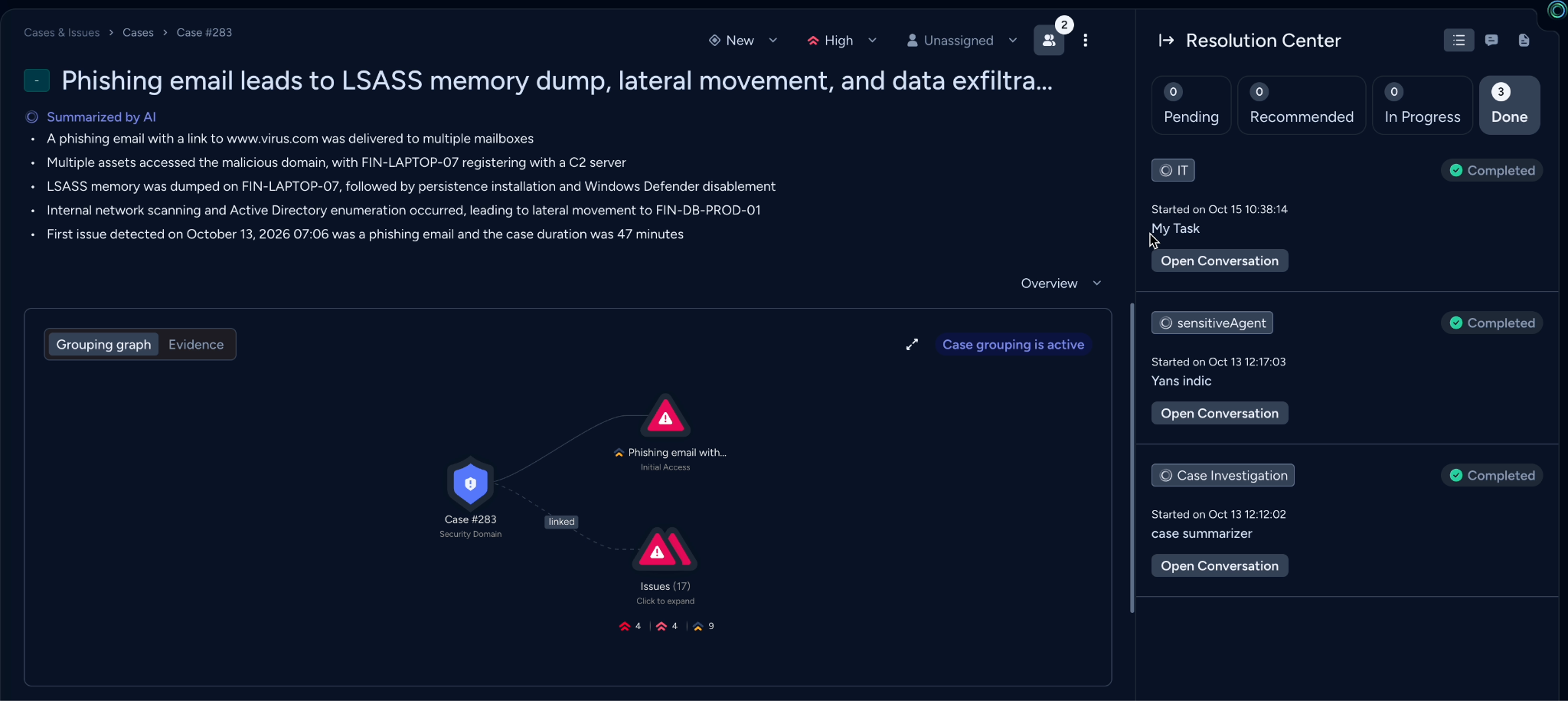
2. Tracking Agent Tasks in the Case Resolution Center
You can follow each agent’s task, review progress and results, and continue the conversation in the case's Resolution Center. Any action flagged as sensitive will be paused for human-in-the-loop approval.
Within the Resolution Center, agent activities are categorized as:
- In Progress: Agent tasks that are currently running, including recurring tasks that have upcoming runs.
- Pending: Agent tasks that are waiting for your input, such as approval for a sensitive action. The task waits there until you approve or cancel the action.
- Completed: Agent tasks that have finished.
When security issues trigger an automated agentic response, the responding agents are automatically enrolled as case team members, binding their telemetry, status, and outputs directly to the case record.
Adaptive Teammates in Real-Time Investigations
Agent collaboration is built for active, in-the-moment investigations:
- Shared Case Context: When you dispatch an agent, it immediately inherits the full history and details of the case. Because tasks live at the case level, all findings, reasoning steps, and actions are shared seamlessly with every team member on the investigation.
- Dynamic, Multi-Agent Dispatch: Complex investigations are rarely linear. Analysts can deploy multiple specialized agents at once, assigning distinct tasks concurrently as new evidence emerges.
- Shared Visibility and Control: Every interaction is fully transparent. Any analyst on the case can view the agent conversations, monitor progress in real time, and approve sensitive actions before they execute.
Moving Toward an Autonomous, Supervised SOC
Agent collaboration points directly to the future of the modern SOC. It exemplifies how security operations will increasingly function with human investigators and AI agents working side by side throughout the incident lifecycle.
As security operations continue to evolve toward this collaborative model, success will no longer be measured by how much an analyst can handle alone. It will depend on how effectively human insight and autonomous agents unite within shared cases to resolve complex threats with precision.
See Agent Collaboration in Action
This feature is available natively embedded in Cortex XSIAM, Cortex AgentiX, Cortex XDR and Cortex Cloud.
Discover how Cortex XSIAM brings AI agents and analysts together to accelerate investigations and advance SOC autonomy. Go behind the scenes of Cortex XSIAM 4.0 to see collaborative AI agents in action, alongside other agentic SOC innovations, expert insights, and a live demo. Watch Agentic SOC Undercover on demand.