Botnets Explained
The term botnet combines the words robot and network to describe an architecture in which automated software agents operate across a vast network of compromised endpoints. While early iterations focused on simple tasks such as managing chatroom protocols, contemporary botnets serve as the primary infrastructure for global cybercrime. They provide adversaries with the scale to overwhelm enterprise defenses through sheer volume.
For cybersecurity professionals, botnets represent a unique challenge because the source of an attack is not a single malicious actor, but rather thousands of legitimate, albeit compromised, user devices. This distribution masks the attacker's identity and complicates mitigation efforts. Understanding the botnet lifecycle is essential for defending against the automated threats that now dominate the digital landscape.
The significance of botnets lies in their role as a force multiplier. By leveraging the processing power and bandwidth of others, attackers can launch distributed denial-of-service (DDoS) attacks, distribute massive volumes of ransomware, or conduct exhaustive brute-force attempts against encrypted targets. This infrastructure is often rented out in a subterranean economy known as botnet-as-a-service, lowering the barrier to entry for sophisticated digital assaults.
The Mechanics of Botnet Architecture
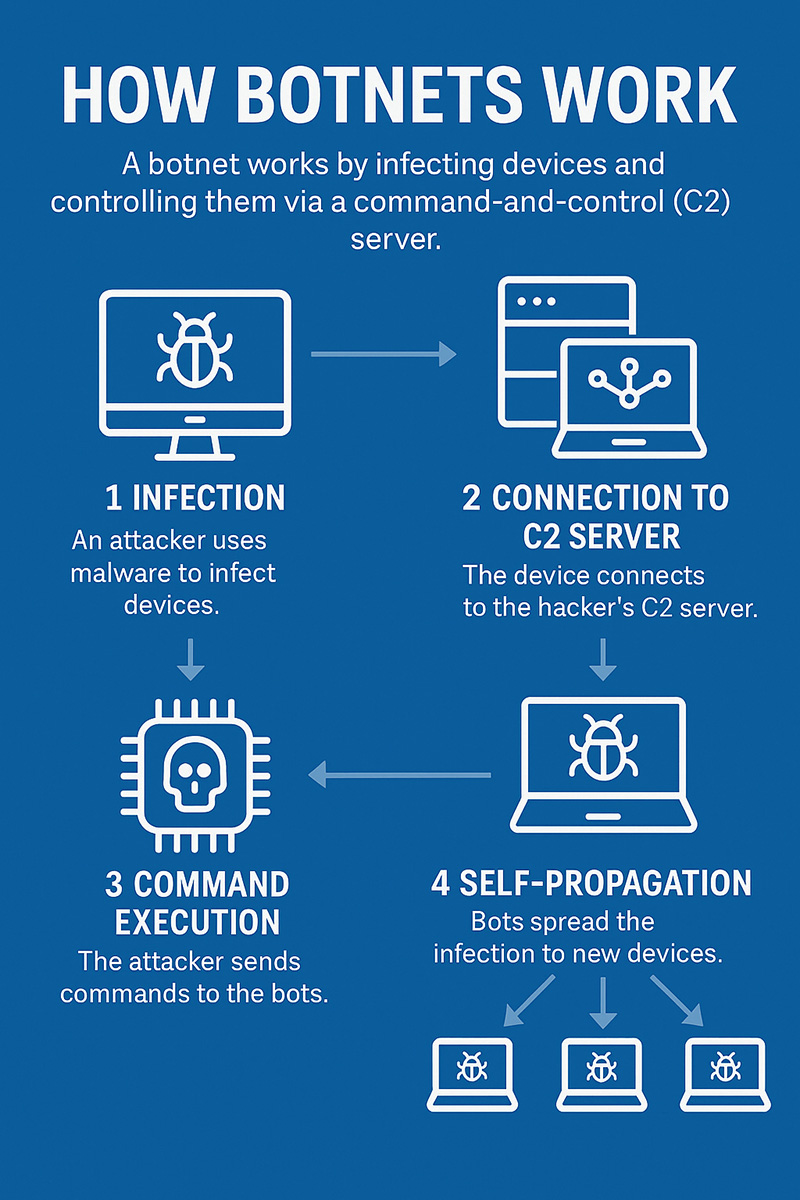
A botnet's effectiveness relies on its communication structure, which dictates how commands reach the infected nodes. The architecture determines the speed of instruction delivery and the network's overall resilience against law enforcement takedowns.
Botnet Architecture
Unit 42 research indicates that phishing and vulnerability exploitation remain the primary access vectors for initial compromise. In many cases, these intrusions exploit known vulnerabilities that have gone unpatched in corporate or consumer environments.
Common Types of Botnet-Driven Attacks
Once a network reaches critical mass, it can be deployed for various disruptive purposes. The diversity of these attacks reflects the versatility of controlling thousands of distinct IP addresses.
- Distributed Denial-of-Service (DDoS): Flooding targets with massive traffic to cause operational downtime.
- Credential Stuffing: Using thousands of IP addresses to bypass rate-limiting during brute-force login attempts.
- Cryptojacking: Hijacking CPU power to mine cryptocurrency, leading to system degradation and high power costs.
- Data Exfiltration: Quietly scraping host systems for personally identifiable information (PII) and financial records.
Identity-based weaknesses now account for nearly 90% of security investigations. Botnets exacerbate this by providing the scale needed to test millions of leaked credentials across multiple platforms simultaneously.
Advanced Evasion and AI-Assisted Botnets
The next generation of botnets utilizes automation and machine learning to bypass traditional security perimeters. These advancements represent a shift from static scripts to dynamic, intelligent attack chains.
The Rise of Agentic AI Attacks
Agentic AI allows botnets to exhibit autonomous decision-making capabilities. Instead of following a rigid set of pre-programmed instructions, AI-driven bots can adjust their tactics in real-time based on the defensive responses they encounter within a network.
Unit 42 simulations have demonstrated that AI-powered attack chains can compress the time from initial compromise to data exfiltration to under 25 minutes. This speed makes traditional manual response times obsolete and necessitates AI-driven defensive measures.
Explore how Unit 42 tracks global botnet activity to stay ahead of emerging threats.
Polymorphic Code and Domain Flux
To evade detection, modern botnets often use polymorphic code that alters its signature with every new infection. This prevents legacy antivirus software from identifying the malware based on known file patterns.
Additionally, botnets use Domain Generation Algorithms (DGAs) to generate and contact thousands of random domains daily, making it impossible for defenders to block the command source by blacklisting a few static IP addresses.
Identifying Botnet Infections on the Network
Early detection is critical to preventing an endpoint from becoming a launchpad for larger attacks. Monitoring for specific network and endpoint anomalies can reveal the presence of hidden bot software.
How to Protect Against Botnets
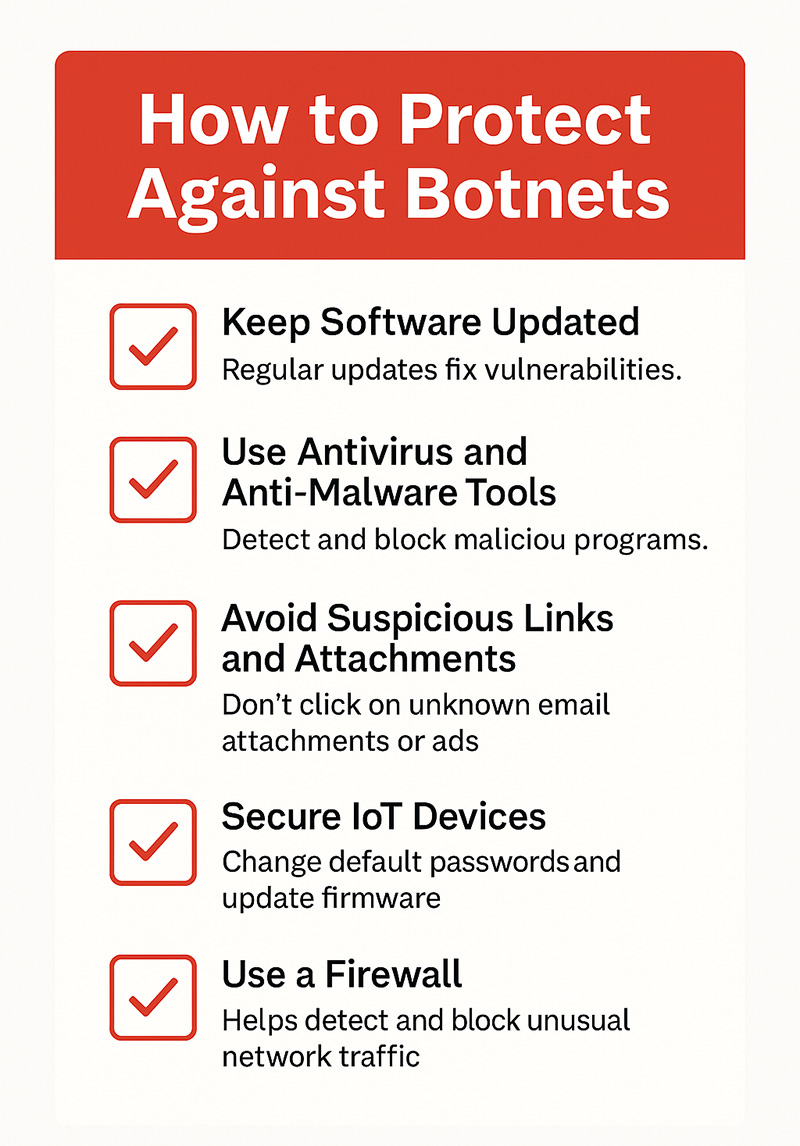
Preventing botnet infections requires a combination of good cybersecurity hygiene, updated technology, and user awareness. Here are essential steps to safeguard your devices and networks:
Keep Software and Devices Updated: Regularly update operating systems, applications, and firmware to patch known security vulnerabilities that botnets exploit. Enable automatic updates whenever possible for desktop and mobile devices, as well as IoT equipment.
Use Antivirus and Anti-Malware Tools: Use reputable antivirus and anti-malware tools to detect, quarantine, and remove threats. Modern solutions often include real-time protection, behavioral monitoring, and threat intelligence to identify botnet activity early.
Be Cautious with Emails and Links: Most botnets begin with a phishing email or a malicious download. Avoid clicking on suspicious links or attachments, especially if the sender is unknown. Watch for emails that urge immediate action or contain strange formatting and grammar.
Secure Your Internet of Things (IoT) Devices: IoT devices are a favorite target for botnets like Mirai because of their weak default security settings.
To protect them:
- Change default usernames and passwords immediately after setup.
- Disable remote access features you don’t need.
- Regularly update device firmware.
- Place IoT devices on a separate network from critical systems, if possible.
Use a Firewall: Firewalls act as a barrier between your network and potential threats. Configure your firewall to monitor outbound traffic to help detect unusual activity, such as a device contacting a known C2 server.
Educate Yourself and Others: Human error remains a major factor in successful botnet infections. Educate employees or family members on the signs of phishing, safe browsing habits, and how to recognize malicious files or websites.
Enable Multi-Factor Authentication (MFA): Add an extra layer of protection to your accounts. Even if a botnet captures your password, it won’t be able to log in without the second authentication factor.
Perform Regular Security Audits: Conduct periodic security checks on your devices and network. Look for outdated software, weak passwords, or unusual access logs. Proactive audits can help you spot signs of compromise before severe damage occurs.
How To Disable a Botnet
Once a botnet is discovered, the two widely used approaches for disabling it are to take down the control centers and remove the malware that controls the botnet. The best approach will depend on the botnet's architecture, scale, and the resources available to the organization.
- Take Down Botnets Control Centers: If a botnet employs a client-server architecture, it can be disabled by shutting down the central server or servers that control it. Taking down a botnet control center usually requires the support of law enforcement.
- Eliminate Botnet Malware on Infected Devices: The easiest way to remove botnet malware from an individual system is to use anti-virus tools. If this does not work, the system needs to be wiped and reimaged. Malware can be removed from IoT devices by performing a factory reset, reformatting the device, or flashing the firmware.
Tools and Techniques for Botnet Defense
Several tools and techniques are available to defend against botnet threats. Some are specific to botnets, and others are part of an organization’s overall security program. The following are several tools and techniques that can be employed.
- Access controls
- Advanced anomaly detection
- Anti-virus software
- Behavioral analysis and machine learning
- Command-and-control (C2) server detection
- Device authentication
- Honeypots and decoys
- Installing updates and security patches
- Masking IP addresses
- Network segmentation
- Rate limiting
- Real-time monitoring
- Signature-based tools
- Strong password policies
- Threat intelligence
- User and entity behavior monitoring
- Using proxy servers
Real-World Examples of Botnets
Many botnet attacks are zero-day varieties. The following is a review of several real-world botnet attacks. While most of these have been disabled, a few are still active.
EarthLink Spammer (Disabled)
One of the first botnets to gain public attention was the EarthLink botnet, also known as the EarthLink Spammer. Launched in 2000, the botnet was used by its creator and other cyber criminals to send more than 1.25 million phishing emails over the EarthLink network.
This botnet software used Trojan horse malware to infect systems and remotely access users' information. Over a year, the EarthLink botnet affected approximately 12% of EarthLink's email traffic and resulted in an estimated $4.1 million in lost profits for the organization.
Cutwail (Disabled)
Discovered in 2007, the Curtwail botnet was sending more than 51 million emails per minute by 2009, accounting for over 45% of the world's spam. It is estimated that, at its peak, the Curwail botnet comprised 1.5 to 2 million infected computer systems sending 74 billion spam emails a day.
Cutwall targeted Windows systems with Trojan horse malware, which used infected computers as spambots. Cutwail was also used to spread well-known malware families and was used as a DDoS botnet for SSL attacks.
ZeuS (Disabled)
The ZeuS botnet, also known as Zbot, was believed to be the most widely used malware, infecting more than 13 million computers in 196 countries.
ZeuS used Trojan horse malware for several nefarious purposes, including spreading CryptoLocker ransomware and stealing credentials for users' accounts, such as social media, banking, FTP, and email accounts. Over 90% of all online bank fraud incidents were attributed to the ZeuS botnet.
Storm (Disabled)
Storm, also known as the Storm Worm Botnet, Dorf Botnet, and E-card Malware, was one of the first peer-to-peer botnets. This Trojan horse malware was available for rent on the dark web.
Believed to have infected up to 2 million computers, Storm was used for various criminal activities, including identity theft, bank fraud, and distributed denial-of-service (DDoS) attacks. This was one of the most virulent botnets, as it had defensive capabilities that thwarted attempts to track and deactivate it.
Kraken (Disabled)
The Kraken botnet was a massive spyware botnet. It was estimated to have infected 10% of all Fortune 500 companies, but each of the almost 500,000 bots in the network could send about 600,000 emails a day. In addition to its size, the Kraken botnet is believed to have been one of the first to employ evasion techniques to evade detection by anti-malware tools.
Grum (Disabled)
Specializing in targeting the pharmaceutical industry with spam, the Grum botnet could send nearly 40 billion emails daily, accounting for around 20% of the world's spam. At its peak, the Grum botnet included more than 100,000 computers.
A notable feature of the Grum botnet was that it used two types of control servers, one for infecting systems and one for sending commands. Additionally, the control servers were located in Panama, Russia, and Ukraine, which provided resiliency and allowed the system to stay operational even when one control server was disabled.
Mariposa (Disabled)
The Mariposa botnet, comprising more than 12 million computers, used worm malware that propagated itself through malicious digital ads, also known as malvertising. This botnet was used to steal sensitive data from over 800,000 users, including credentials for financial services sites and credit card numbers. It was also used to launch online scams and DDoS attacks.
GameOver Zeus (Disabled)
After the client-server ZeuS botnet was disabled, GameOver Zeus (GOZ) emerged with a peer-to-peer architecture, making it harder to disrupt. Before it was disrupted, GameOver Zeus had infected over 250,000 computers and caused an estimated $100 million in monetary losses.
Dridex (Active as of May 2024)
Dridex, also known as Bugat and Cridex, is a Trojan horse malware that mainly spreads through phishing campaigns. It is delivered as a Word or Excel document attachment with a malicious macro that downloads and executes malware.
Distributed through a malware-as-a-service model, this infostealer botnet is used to perform various malicious actions, including stealing users' information by capturing screenshots, keylogging, and launching ransomware attacks.
ZeroAccess (Disabled)
Built to target Microsoft Windows operating systems, ZeroAccess is a peer-to-peer botnet that uses Trojan horse malware. The ZeroAccess botnet was particularly difficult to disable because it evaded detection by using a trick to disable anti-virus software running on infected systems. Growing to more than 9 million computers, the ZeroAccess botnet was used for cryptocurrency mining and spamming malware.
3ve (Disabled)
3ve was the head of three interconnected sub-botnets used for ad fraud. The botnet was used to create more than 5,000 fake websites, spoofing the domains of high-ranking and prestigious publishers and selling their "premium" traffic to advertisers.
3ve was believed to have generated 3-12 billion ad bid requests daily using the more than 1.7 million computers under its control. By using an anti-forensics evasion tactic, 3ve is estimated to have collected around $30 million before it was disabled.
Emotet (Active as of August 2024)
Emotet, also known as Heodo and Geodo, is considered one of the most dangerous botnets because it is polymorphic, changing its code each time it is called up. It uses Trojan horse malware to spread and distribute other malware and ransomware. Threat actors use Emotet to commit financial fraud, espionage, and political sabotage with malicious spam.
Mirai (Active as of August 2024)
The Mirai botnet is known for targeting and weaponizing IoT devices. It is believed to have infected over 600,000 devices, which it uses to launch DDoS attacks. In 2016, it ran a 1TB/second DDoS. The Mirai source code is publicly available and has been used to create hundreds more botnets. Mirai is considered to be the largest IoT botnet.
Botnet FAQs